


Never Leave Outlook: Introducing MatterSync

AI-powered matter filing and creation, directly from your inbox — no new software, no manual saving.

In-house legal teams increasingly manage matters, correspondence, and documents through Microsoft 365 — but the moment work happens in the inbox, that structure breaks down. Filing an email to the correct matter folder means leaving Outlook, opening SharePoint, finding the right folder, and manually saving the message and any attachments. Multiply that by every email, every day, across a team, and the manual effort adds up quickly — along with the risk that something is filed to the wrong matter, or not filed at all.

Meanwhile, working out which matter an incoming email actually belongs to is often guesswork: searching a spreadsheet or SharePoint list by hand, or relying on institutional memory of who's handling what.

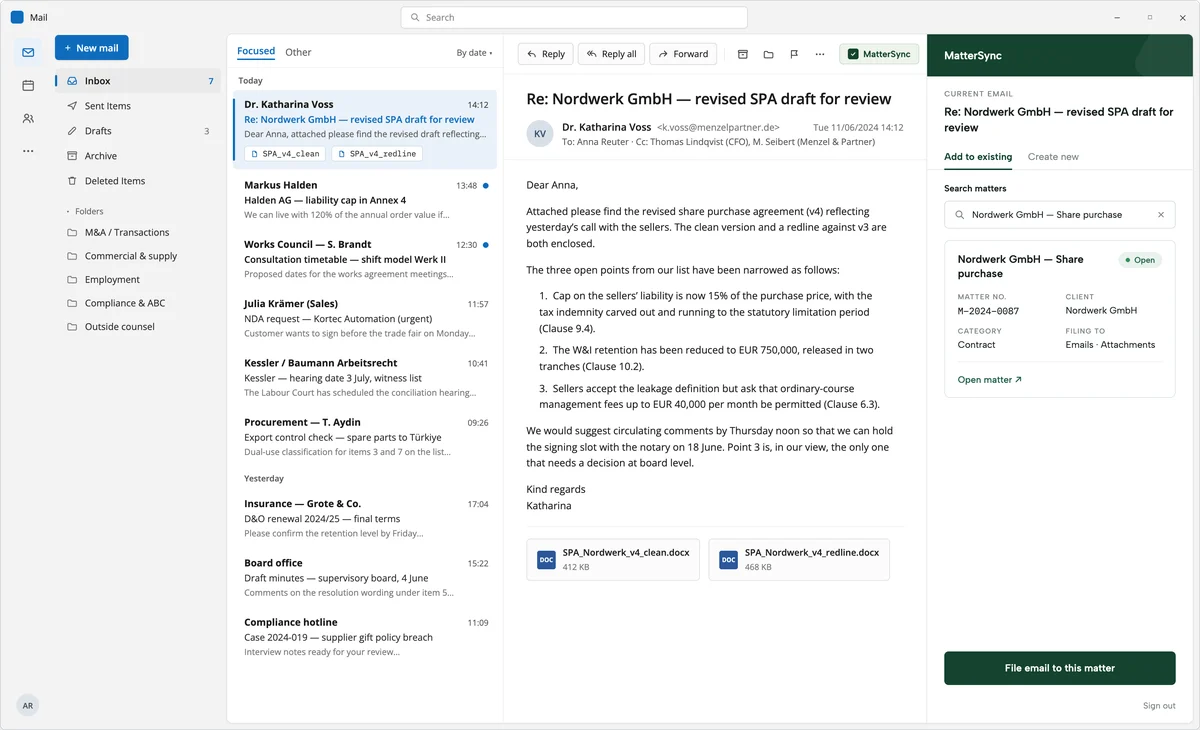
MatterSync is a lightweight, secure Outlook add-in from NodeMasters that brings matter filing directly into the inbox. With a single click, users can create a new matter or match the current email to an existing one, then automatically file the email and its attachments to the correct SharePoint matter folder — including the option to file an entire email thread in one go.

AI can be enabled to pre-populate new matter fields (title, category, requestor) from the email content and to suggest the most likely existing matter match, saving further time on manual entry. AI is entirely optional and can be switched on or off per user, and can run on your own Azure OpenAI or Azure AI Foundry deployment, or Microsoft 365 Copilot where available — so no email content ever leaves your organisation's Microsoft tenant.

Because MatterSync is built on Microsoft 365 and your existing SharePoint matter list, there is no new software to procure, no data migration, and no lengthy security review — most teams are up and running within days.

Beckman CoulterThe logo of StihlFintelTHe logo of EnBWHellmann Worldwide LogisticsVaillant Group

Key Benefits

Tick Symbol
File emails and attachments to the correct SharePoint matter folder in one click, without leaving Outlook
Tick Symbol
AI-powered matter matching and field pre-population — no more guessing which matter an email belongs to (fully optional, on your own Microsoft tenant)
Tick Symbol
File an entire email thread to a matter in a single action
Tick Symbol
Built on Microsoft 365 — no new software licences, no per-seat fees, no data leaving your tenant
Tick Symbol
Works with your existing SharePoint matter list and folder structure — no migration required
Tick Symbol
See key matter details — status, category, requestor — directly inside Outlook
See MatterSync in Your Inbox
Book a Demo

Get a personal walkthrough of MatterSync and see how it fits your team's existing Microsoft 365 setup. Either book a demo now or let us reach out to you.

Vielen Dank! Wir werden uns mit weiteren Informationen bei Ihnen melden
Oops! Something went wrong while submitting the form.

Our MatterSync Outlook Add-In in detail:

How It Works

MatterSync adds a task pane to Outlook. When a user opens an email, the add-in shows suggested existing matters, or lets them create a new one. Filing an email — with or without its attachments — saves it directly to the matter's folder in SharePoint, correctly named and organised alongside any other documents for that matter. An entire thread can also be filed in one action, so replies and forwards don't need to be handled individually. Matter details, including a direct link to the SharePoint folder, remain visible in the task pane throughout.

AI-Powered Matching & Pre-Population

When enabled, MatterSync uses AI to suggest the most likely existing matter for the current email, and to pre-populate the title, category, and requestor fields when creating a new matter — reducing manual data entry to a final check rather than a blank form.

AI is entirely optional, can be toggled on or off by each user, and is never required for the add-in's core filing functionality. Where used, it runs on your organisation's own Azure OpenAI or Azure AI Foundry deployment (including Anthropic's Claude models), or on Microsoft 365 Copilot where your organisation holds the relevant licences — so email content is never sent to a third party outside your Microsoft tenant.

Security & Deployment

MatterSync uses your organisation's existing Azure AD sign-in and SharePoint permissions — there is no separate username or password, and no new data store. The add-in itself has no backend of its own: it runs entirely in the browser and communicates directly with Microsoft Graph using your existing credentials. Configuration is stored as a single file in your own SharePoint site, and can be updated at any time without redeploying the add-in.

Part of a Bigger Picture

MatterSync works as a standalone add-in for any team already using a SharePoint-based matter list, or as an extension of NodeMasters' broader Matter Management solution for in-house legal teams. Either way, it plugs into the systems you already have rather than introducing a new one.

Pricing

MatterSync is offered as a one-off implementation fee with no ongoing per-user licence costs beyond your existing Microsoft 365 subscription. Configuration and rollout typically take a few days once your SharePoint matter list is in place.

Enabling the optional AI features may require an Azure OpenAI or Azure AI Foundry deployment in your tenant, which carries its own usage-based cost separate from NodeMasters' implementation fee — we're happy to advise on estimated volumes upfront.

Exact pricing to be confirmed.

Three NodeMasters co-founders (Thom, Steffen & Wolfgang) stood in a line in front of an exposed concrete background, dressed in sweaters and white shirts, smiling at the camera.

Eigene Ideen?

Gerne sprechen wir mit Ihnen über Ihre Digitalisierungsideen und entwerfen gemeinsam die nächsten Schritte.