


Turn noise into meaningful insights - Legal Dashboard

See your team's work volume, turnaround times, cost and more — all your data, finally in one place.

You can only manage what you measure. Very little in a legal department gets measured, meaning it's hard to pinpoint trends and take the appropriate action. You know the volume of requests has been climbing for three years because it feels that way. You suspect a standard contract takes longer to turn around than it used to. If you were to ask which part of the business generates the most work, everyone on the team would give a slightly different answer.

This means Legal is often the only function that walks into a budget conversation without numbers. And the decisions that follow — a headcount, an instruction to outside counsel, a piece of software — often are lacking without the real data behind them to justify the spending.

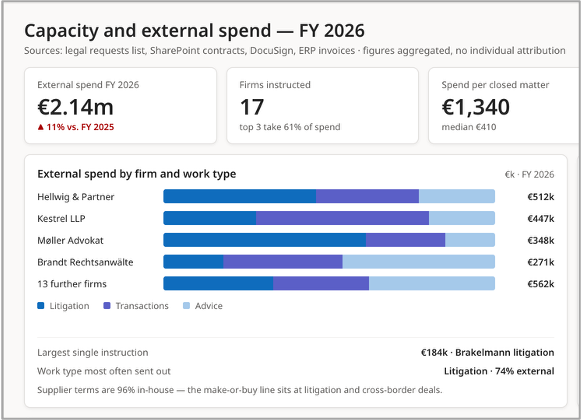
The data already exists. Every request in the shared inbox, every contract in SharePoint or the CLM, every approval, every signature, every law firm invoice is a data point sitting somewhere — often already inside Microsoft 365. Our Legal Dashboard brings that data together and makes sense of it, so you can finally see how many matters come in and from which part of the business, how long they take, how the work is spread across the team, as well as how much you're spending externally and on what.

Exactly what is collected and visualised is all tailored to your requirements. Additionally, optional AI can pull insights out of plain text (e.g. the subject of a request) across historical work that hasn't been captured in a list or table. The result is powerful, up to date insights into the team's work and value add to the business — which can in turn drive actions and decisions to continuously improve.

Beckman CoulterThe logo of StihlFintelTHe logo of EnBWHellmann Worldwide LogisticsVaillant Group

Key Benefits

  • Visualise demand and throughput: volume, where it comes from, turnaround times, waiting times, bottlenecks
  • Oversee capacity and cost: how work is spread across the team, external spend by firm, topic and business function
  • Gain a defensible basis for headcount, budget and make-or-buy decisions
  • No timesheets, and no assessment of individuals
  • Optional AI: topics and areas of law pulled out of free text, including retrospectively
  • Data from neighbouring systems where you want it: CLM, eSignature, ERP, ticketing and deadline systems
  • Built in Power BI on the Microsoft 365 you already run — your data stays in your tenant
See the Legal Dashboard in Action
Book a Demo

We'd be glad to show you in a short call what a Legal Dashboard looks like and how it can work in your business. Book a demo now, or leave your details and we'll get back to you shortly.

Thank you!
We'll reach out to you with further information
Oops! Something went wrong while submitting the form.

The Legal Dashboard in Detail:

Insights without Micro-Managing

Most of what a legal dashboard typically shows has very little to do with individual workloads. Instead you'll have the big picture of how many requests arrive and from which parts of the business, how the topics break down, which contract types take longest, what's being spent on external instructions and with which firms.

If you need to ensure (due to local regulations) that the dashboard isn't capable of monitoring individual performance and behaviour, we can design for that from the outset: by default, figures aggregate at team, practice-area and business-function level, with minimum thresholds below which numbers are masked or simply not shown. Anything attributable to an individual appears only where you've decided it should — deliberately, and visible only to the roles that need it.

Project Approach and Pricing

We start with a workshop (virtual or in-person) to gather: which questions you want to be able to answer, which measures follow from those, and what data you already hold to support them. From there we'll build the dashboard, test it against your real data, sharpen it with you, and document the data model and the definition of every measure — then either hand over to your team or stay on for ongoing support. Where significant data sits outside Microsoft 365 — in a CLM, your eSignature platform, the ERP or a ticketing system — we'll connect those sources too.

  • Exploration workshop: £3,500 / €4,000 / $4,500. Captures the measures you want to see, an honest picture of the state of your data, and provides a reliable estimate for the build
  • Implementation: from £7,000 / €8,000 / $9,500, depending on how many data points are in scope and what condition the data is currently in
  • Additional data sources outside Microsoft 365 are charged on a time-and-materials basis
  • Ongoing costs: utilises your existing Microsoft licensing, plus Power BI for the people who use the dashboard
Three NodeMasters co-founders (Thom, Steffen & Wolfgang) stood in a line in front of an exposed concrete background, dressed in sweaters and white shirts, smiling at the camera.

Tell us your bottleneck…

NodeMasters is the on-demand legal tech consultancy that fits around how your team already works.
Whether you're looking at AI & automation for the first time or need expert support with your existing technologies, we can help.